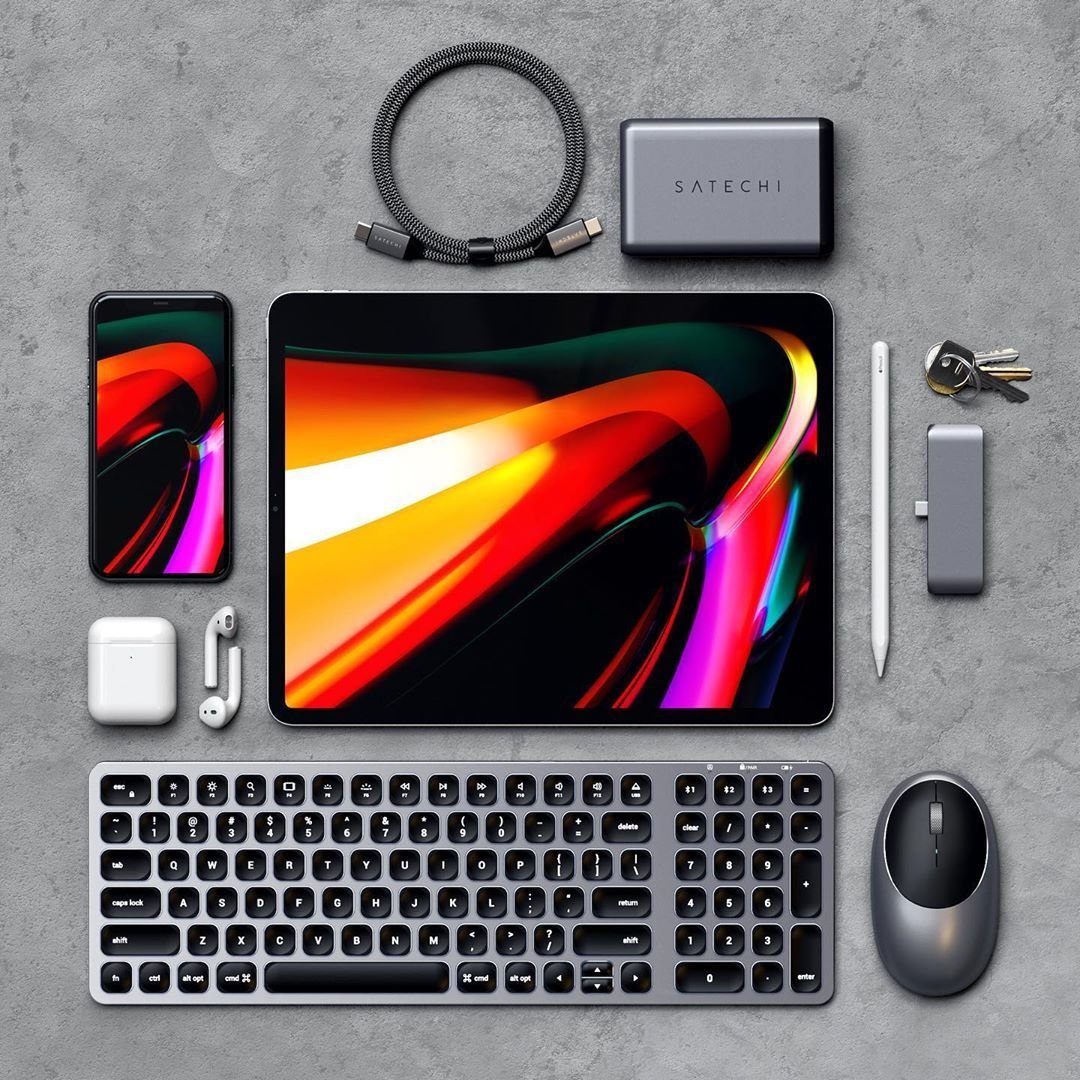
Your iPad Pro 12.9 (4th Gen) is a powerful piece of technology, a canvas for creativity, and a portable workstation all rolled into one. But to truly unlock its potential—to transform it from a great tablet into an indispensable tool—you need the right gear. Forget basic functionality; we’re talking about Essential Accessories for iPad Pro 12.9 (4th Gen) that elevate your experience, enhance productivity, and safeguard your investment. Think of these add-ons not as mere extras, but as critical components that tailor your iPad to your specific needs, whether you’re a digital artist, a student, a business professional, or just someone who loves streaming movies on a beautiful, expansive screen.
At a Glance: Your Must-Have iPad Pro Accessories
- Protect Your Investment: A robust case is non-negotiable for drop protection and screen safety. Look for folio styles with adjustable angles and Apple Pencil storage.
- Unlock Creativity & Productivity: The Apple Pencil (2nd Gen) is key for drawing and precise note-taking, while a good keyboard case turns your iPad into a laptop replacement.
- Enhance Ergonomics: Stands and mounts offer comfortable viewing angles for any task, from video calls to long typing sessions.
- Expand Functionality: USB-C hubs add vital ports for external displays, storage, and peripherals.
- Stay Powered Up: High-capacity power banks and efficient chargers ensure you’re never caught without juice.
- Boost Precision: A quality trackpad or mouse can refine your workflow, especially for detailed tasks.
First Things First: Identifying Your iPad Pro 12.9 (4th Gen)
Before diving into accessories, it’s crucial to confirm your iPad model. Accessory makers are specific about compatibility, and a slight generation difference can mean a case or a stylus simply won't fit or function correctly.
To identify your iPad Pro 12.9 (4th Gen):
- Check the Back: Flip your iPad over. Near the bottom, you'll find tiny text, including a model number that starts with "A". For the 4th Gen 12.9-inch iPad Pro, these model numbers are typically A2229, A2069, A2232, or A2233.
- Software Check: Go to Settings > General > About, and look for "Model Name" (e.g., "iPad Pro (12.9-inch) (4th generation)").
- Compatibility: This model primarily uses the Apple Pencil (2nd Generation) and connects via USB-C. Knowing these details will be your guiding light when shopping. Understanding the 4th Gen iPad Pro 12.9 chip (A12Z Bionic) also helps in appreciating the processing power you have for demanding applications.
Many accessories are designed for the latest hardware, but often, previous generations have compatible versions available. Always search for the product name and "iPad Pro 12.9 (4th Gen)" to ensure a perfect fit.
Safeguarding Your Investment: Cases & Screen Protectors
Your iPad Pro is a significant investment, and protecting it from everyday bumps, scratches, and drops is paramount. A good case offers peace of mind, while a screen protector guards against blemishes that can degrade your viewing and interaction experience.
The Best Overall Folio Case: Zugu Case
When it comes to comprehensive protection without sacrificing style or functionality, the Zugu Case stands out. It boasts a rigid bumper and a generous lip around the screen, providing excellent drop protection. The magnetized cover snaps shut securely, automatically waking or sleeping your display—a small but convenient detail.
What truly sets the Zugu apart is its versatility. A clever flap on the back allows for magnetic adjustment into up to eight different viewing angles, providing exceptional stability whether you’re working at a desk or lounging with your iPad on your lap. Plus, its magnetic properties let you stick your iPad Pro to metal surfaces like a fridge, making it perfect for hands-free recipe following or quick reference. It even includes secure storage for your Apple Pencil (2nd Gen), ensuring it's always ready. Reasonably priced and available in various colors, the Zugu Case is a well-designed workhorse.
A Reliable Stand-Up Case for the Budget-Conscious: Spigen Rugged Armor Pro
If you're looking for solid protection without a premium price tag, the Spigen Rugged Armor Pro is an excellent choice. This case wraps your iPad Pro's edges in a protective bumper and features a tough back cover made from a combination of thermoplastic polyurethane and polyurethane leather. Its magnetic latch keeps the display cover closed, though it doesn't automatically trigger the screen's wake/sleep function.
The display cover cleverly folds into a stand, offering two stable angle options perfect for "Theater Mode" (media consumption) or typing. Critically for the 4th Gen, it includes a dedicated spot to secure your Apple Pencil (2nd Gen), allowing it to still pair and charge seamlessly. It’s a pragmatic choice for durable, everyday use.
The Premium Touch: Nomad Leather Folio
For those who appreciate the tactile feel and sophisticated look of genuine leather, the Nomad Leather Folio offers a blend of elegance and practicality. This folio attaches magnetically to your iPad Pro, adding less bulk than some clip-in cases while still providing a protective layer. The magnetic flap also neatly accommodates your Apple Pencil, keeping it secure.
The cover folds into multiple kickstand angles, allowing for versatile viewing options. While it offers less rugged protection than a heavy-duty bumper case, its sleek appearance and quality materials make it a stylish choice for professionals or anyone who values aesthetics.
Protecting Your Display: Screen Protectors
A screen protector is an invisible guardian for your iPad’s most vital component.
- A Great Standard Protector: Casetify Impact Screen Protector. This super-thin film maintains excellent touch sensitivity and is notably fingerprint-resistant. It comes with everything you need for a smooth, bubble-free application, including a microfiber cloth, wet/dry wipes, and a de-dusting sticker. The goal here is simple: for it to feel exactly like your iPad's naked display, but with an added layer of resilience. This is a solid choice for general protection and maintaining visual clarity.
- Turning Tablet to Paper: Astropad Rock Paper Pencil (V2). For artists and note-takers, the feel of pen on paper is paramount. The Rock Paper Pencil offers a reusable screen protector that uses NanoCling technology for static cling, creating a paper-like texture without any permanent adhesive. It’s easy to apply, realign, and doesn't leave residue. This version also includes specific Apple Pencil tips designed to enhance the "paper" feel, making writing and drawing more natural. While it can be prone to fingerprints, they wipe off easily. This accessory truly shines for those who regularly use their Apple Pencil and are looking for iPad accessories for creatives.
- The Original "Paper-Like" Experience: Paperlike Screen Protector. This widely recognized film is another excellent option for mimicking the feel of paper. It requires thorough screen cleaning for application but provides a satisfying resistance that many artists and writers find beneficial for detailed work. It’s a worthwhile investment if precision and a natural drawing/writing feel are high priorities. If you want a deep dive into options, check out our iPad screen protector guide.
Elegant Portability: Woolnut Leather Sleeve
Sometimes, you need to slip your iPad into something a bit more refined for transport. The Woolnut Leather Sleeve feels exquisite in hand and is roomy enough to accommodate your 12.9-inch iPad Pro even with a slim case attached. It includes a thoughtful leather loop for your Apple Pencil and a slot that allows for USB-C charging without removing the iPad. This sleeve can even double as a simple stand, offering one stable viewing angle for quick use on a lap. It's a stylish and practical companion for carrying your iPad Pro.
Unleashing Productivity & Creativity: Keyboards & Pencils
The iPad Pro truly shines as a productivity and creativity powerhouse when paired with its essential input devices. For the 4th Gen 12.9-inch model, the Apple Pencil (2nd Gen) is non-negotiable for precision, while a quality keyboard transforms it into a formidable laptop alternative.
The Apple Pencil: Your Creative Wand
For the iPad Pro 12.9 (4th Gen), the Apple Pencil (2nd Generation) is the designated stylus. It magnetically attaches to the side of your iPad for pairing and charging, eliminating the need for separate cables or worrying about battery life. Its pressure sensitivity and tilt detection make it indispensable for digital art, precise photo editing, and natural-feeling note-taking. The double-tap gesture on its barrel allows for quick tool switching in many apps, streamlining your workflow.
While Apple now offers the Apple Pencil USB-C and the Apple Pencil Pro for newer models, the 2nd Gen remains the optimal and compatible choice for your 4th Gen iPad Pro. Many retailers still offer it, ensuring you can acquire this powerful tool.
Transforming into a Laptop: Keyboard Cases
A keyboard case is arguably the most impactful accessory for turning your iPad Pro into a serious work machine.
- The All-in-One Powerhouse: Logitech Combo Touch. This keyboard case is a standout for its integrated keyboard, trackpad, and stable kickstand. It connects via Apple's Smart Connector, meaning no Bluetooth pairing hassles or separate charging. The backlit keys offer a comfortable typing experience, and the trackpad supports iPadOS gestures, turning your iPad Pro into a true laptop replacement. The case itself is slim with a fabric texture and provides good protection. While newer versions exist for the latest M4 iPad Pros, older versions are readily available and compatible with your 4th Gen 12.9-inch iPad Pro, offering superb functionality. The main consideration is the added weight, which can make your iPad Pro feel significantly heavier, but for serious work, it’s a small trade-off. It’s easily one of the best keyboard cases for your iPad.
- A Protective Keyboard Option: Zagg Pro Keys (1st Gen). While the Zagg Pro Keys 2 is designed for the M4 iPad Pro, the original Zagg Pro Keys offers similar benefits for older iPad Pros, including your 4th Gen 12.9-inch model. This detachable keyboard case provides a more protective folio cover compared to some slimmer options. It does not use the Smart Connector, requiring USB-C charging for its keyboard, and it lacks a trackpad, meaning you'll need an external mouse for cursor input. However, its robust design and good key travel make it a solid choice for those prioritizing protection and a comfortable typing experience, without the trackpad integration.
Ergonomic Aid for Your Pencil: Paperlike Pencil Grips
For extended drawing or writing sessions, hand fatigue can be a real issue. Paperlike Pencil Grips offer a simple yet effective solution. This two-pack typically includes a Maximum Comfort Grip (designed to reduce fatigue) and a Maximum Precision Grip (to improve stroke accuracy). The Comfort Grip is particularly useful for prolonged note-taking. Crucially, these grips are designed not to interfere with the 2nd-generation Apple Pencil's convenient double-tap feature, making them ideal for artists and students alike.
The Standalone Keyboard: Logitech K380
Sometimes, you just need a reliable, portable keyboard without the bulk of a case. The Logitech K380 is a popular choice for its quiet, tactile keys and slim, lightweight design. It connects via Bluetooth and has the handy ability to switch quickly between three paired devices, making it versatile for multi-device users. Powered by two AAA batteries that can last for months, it’s a truly portable option. While it lacks backlighting, its compact nature makes it perfect for tossing into a bag for on-the-go typing.
Ergonomics & Versatility: Stands & Mounts
Holding a 12.9-inch iPad Pro for extended periods can be tiresome. Stands and mounts liberate your hands, provide optimal viewing angles, and open up new possibilities for how and where you use your device.
The Reliable Desktop Companion: Satechi Aluminum Desktop Stand
For a dedicated desk setup, the Satechi Aluminum Desktop Stand is hard to beat. Its robust build has been known to support a 12.9-inch iPad Pro for years without the hinges loosening, a testament to its quality. Featuring a non-slip rubber base, it stays put on your desk. Two hinges allow for precise adjustments to both height and viewing angle, ensuring comfortable ergonomics whether you’re typing, drawing, or video conferencing. It's lightweight and portable enough to move around your workspace as needed.
Clearing Your Workspace: Twelve South HoverBar Duo 2.0
If desk space is at a premium or you want the flexibility to use your iPad in various locations, the Twelve South HoverBar Duo 2.0 is an excellent solution. This versatile mount allows you to adjust your iPad's screen angle and height, clearing up valuable surface area. Its slim clamp can securely attach to shelves, kitchen counters, or desks. What’s brilliant is its dual nature: it includes a weighted stand, allowing you to easily transfer the arm holding your iPad between the clamp and the stand. This model supports the 12.9-inch iPad Pro, and its hinges can be tightened with an included hex key, ensuring long-term stability.
Hands-Free Entertainment: Lamicall Gooseneck iPad Holder
For ultimate relaxation, especially when watching movies or shows in bed, a gooseneck mount is invaluable. The Lamicall Gooseneck iPad Holder features a flexible, adjustable rod that securely clamps to a desk or nightstand and reportedly doesn't loosen over time. It provides a truly hands-free viewing experience, allowing you to position your iPad exactly where you want it. While it might be a bit wobbly when you directly tap the screen, for passive media consumption, it's a game-changer.
Expanding Connectivity & Storage: Hubs & Drives
The iPad Pro’s single USB-C port is powerful, but it's still just one port. A good hub expands its capabilities significantly, allowing you to connect external displays, accessories, and storage, while portable drives give you crucial extra space. These accessories are key for iPad Pro productivity tips.
The Versatile Hub & Stand: Satechi Aluminum Stand & Hub
Combining two essential functions, the Satechi Aluminum Stand & Hub is a minimalist’s dream. It connects via a hidden USB-C cable and provides a wealth of ports: an HDMI port (4K output), a USB-A port, a 3.5-mm audio jack, and both SD and MicroSD card readers. It even includes a 60-watt USB-C charging port for pass-through power. As its name suggests, it doubles as a stand, though its viewing angle is fixed. It folds up compactly, making it highly portable. This is particularly handy for connecting to external monitors or offloading media from cameras.
The Compact Connectivity Solution: Twelve South StayGo Mini
For a smaller, more portable hub, the Twelve South StayGo Mini packs a punch. It's impressively compact—taller but narrower than a Zippo lighter—and offers a 4K HDMI port, a USB-A port, an 85-watt USB-C port with pass-through charging, and a headphone jack. If your iPad Pro is in a thick case, the hub might not fit flush, but Twelve South thoughtfully includes a female USB-C to male USB-C cable to resolve this, ensuring compatibility.
Portable Storage: SSDs & Flash Drives
Running out of space or needing to transfer large files on the go? These storage solutions have you covered.
- Speedy External SSD: OWC Envoy Pro Elektron SSD. This portable NVMe SSD is a fantastic choice for fast, reliable external storage. It boasts impressive speeds, a durable aluminum build, and is even water-resistant. Its compact size, slightly larger than an Altoids tin, makes it incredibly portable. It comes with a USB-C to USB-C cable and a USB-A adapter for broad compatibility. Available in capacities from 240 GB to a generous 2 terabytes, it’s perfect for video editors, photographers, or anyone dealing with large datasets.
- The Go-Anywhere Flash Drive: SanDisk iXpand Luxe. Designed for ultimate portability and cross-device compatibility, the SanDisk iXpand Luxe features a Lightning port on one end and a USB-C port on the other. This makes it incredibly convenient for transferring data between your iPad Pro and other devices, including iPhones or older computers. With storage options up to 256 gigabytes, it requires the SanDisk iXpand Drive app for seamless use. For those with older devices or specific needs, the SanDisk iXpand Flash Drive Go offers Lightning and USB-A connections.
Powering Up: Chargers & Battery Packs
A powerful tablet needs powerful charging solutions. Staying powered on the go is crucial for uninterrupted productivity and entertainment. These accessories ensure your iPad Pro is always ready for action. For more comprehensive insights, check out charging solutions for your iPad Pro.
The Everyday Fast Charger: Nomad 65W Slim Power Adapter
A compact yet powerful wall charger is a must-have. The Nomad 65W Slim Power Adapter stands out for its sleek design and dual USB-C ports. When charging two devices simultaneously, it intelligently distributes power, typically delivering 45 watts to one port (perfect for your iPad Pro) and 20 watts to the other, providing a reasonably fast charge for both. Its foldable prongs enhance portability, making it an ideal travel companion.
High-Capacity On-the-Go Power: 145W Power Bank
For serious power on the move, the 145W Power Bank is a robust choice. With a massive 25,000-mAh battery capacity and a total output of 145 watts, it can charge your iPad Pro quickly and even handle more demanding devices like MacBook Pros. It delivers 100 watts via one USB-C port and 45 watts via the second, ensuring rapid charging for multiple devices. Despite its power, it's reasonably compact (weighing about 1.1 pounds) and features an LED screen to display remaining battery life.
A Feature-Packed Portable Charger: Raycon Magic Laptop Power Bank 5-in-1
The Raycon Magic Laptop Power Bank offers impressive versatility in a compact, square build. It features a 15,000-mAh battery capacity and a 65-watt output, suitable for recharging your iPad Pro multiple times. Beyond its USB-C and USB-A ports, it uniquely includes a built-in Lightning cable and a USB-C cable, eliminating the need to carry extra wires. It even functions as a wireless charging pad, adding another layer of convenience. A digital display keeps you informed about current power output and remaining battery life.
Durable & Eco-Friendly Cables: Nimble PowerKnit USB-C to USB-C
You can never have too many reliable charging cables. The Nimble PowerKnit USB-C to USB-C cables are rated for 60 watts, making them perfect for fast charging your iPad Pro. They stand out for their durable knit fabric design and their eco-conscious construction, made from certified recycled plastic and aluminum, and free from BPA and PVC. Available in 1-, 2-, or 3-meter sizes, they offer an affordable and robust alternative to standard cables.
Precision Control: Mice & Trackpads
While touch and the Apple Pencil are excellent for many tasks, a mouse or trackpad can offer enhanced precision and a more traditional desktop-like workflow, especially when using your iPad Pro for intricate tasks or prolonged periods.
The Sleek Companion: Apple Magic Trackpad 2
For a truly integrated experience, the Apple Magic Trackpad 2 is a natural fit. Its slim and light design complements the iPad Pro perfectly. Featuring Force Touch sensors, it provides pressure feedback instead of physical buttons, allowing for intuitive gestures within iPadOS. It pairs seamlessly via Bluetooth and recharges via its USB-C port. While an investment, it offers a premium, consistent experience for those accustomed to Apple's trackpads.
The Traditional Feel: M1 Wireless Mouse
If you prefer the familiar ergonomics of a traditional mouse, the M1 Wireless Mouse is a solid option. It’s designed for comfort with responsive buttons and a smooth scroll wheel. Its USB-C charging port is conveniently located on the front, allowing you to use it even while it’s charging. Available in various colors (including gold, rose gold, blue, silver, and space gray), it’s a practical and stylish choice for precise cursor control.
Making Your Choice: A Buyer's Guide to iPad Pro Accessories
With so many excellent options, how do you decide which accessories are right for you? Consider these factors:
- Your Primary Use Case:
- Artist/Designer: Prioritize Apple Pencil (2nd Gen), Astropad Rock Paper Pencil, and a stable stand.
- Student/Writer: Focus on a comfortable keyboard case (Logitech Combo Touch), Apple Pencil (2nd Gen) for notes, and a portable hub for presentations.
- Traveler/Commuter: Look for a durable, slim case (Zugu Case), a compact power bank (145W Power Bank), and perhaps the Logitech K380 standalone keyboard.
- Media Consumer: A great stand (Satechi Aluminum Desktop Stand or Lamicall Gooseneck) and a sturdy protective case are key.
- Budget: Accessories range widely in price. Determine what you're willing to invest, but remember that quality accessories often pay for themselves in durability and enhanced usability.
- Portability Needs: How often do you carry your iPad Pro? Slim, lightweight options are best for daily commuters, while those primarily using it at a desk might opt for larger, more feature-rich accessories.
- Future-Proofing (Within Reason): While your 4th Gen iPad Pro is still a powerhouse, consider accessories that use universal standards like USB-C where possible, for potential future device compatibility.
The Final Word: Elevate Your iPad Pro Experience
Your iPad Pro 12.9 (4th Gen) is a fantastic device, but it’s truly brought to life by the right accessories. From rugged protection to precision input devices, each addition can unlock new possibilities, streamline your workflow, and make your daily interactions more efficient and enjoyable. Take the time to identify your needs, choose wisely from these curated recommendations, and watch as your iPad Pro transforms into the ultimate personalized tool. It’s not just about what the iPad can do, but what it can do for you when equipped with the perfect companions.